
Back in September of last year I blogged about an issue I was facing with the task burndown excel report and workbooks that ship with TFS. http://thebasilet.blogspot.com/2010/09/tfs-2010-task-burndown-excel-report-not.html
Brian Harry & Aaron Bjork from Microsoft were very helpful in lending their help to troubleshoot this issue. However, until last week we were ready to give up hope. That is until I stumbled upon the solution thanks, to some comments Aaron made.
Here's the deal, the excel filtering issue I was observing from TFS is actually a bug in Sql Server 2008R2 Analysis Services and is described here
http://support.microsoft.com/kb/982850/
It can be resolved by applying one of the Cumulative Updates on Sqlserver2008r2.
http://support.microsoft.com/kb/981356
Tuesday, February 1, 2011

Wednesday, October 27, 2010
TFS 2010 Team Build & ClickOnce Deployment
***Update***
Here is the template, if you'd rather just use it.
************
If you've searched and searched for an out of the box solution to deploying Click Once applications using Team Build 2010 you are in for some disappointment. There isn't one.
However, here are 5 easy steps to get this working. There are multiple ways to achieving a workable solution, have in mind that this solution worked for me, but might ultimately not help you. YMMV
The default build template works something like this.
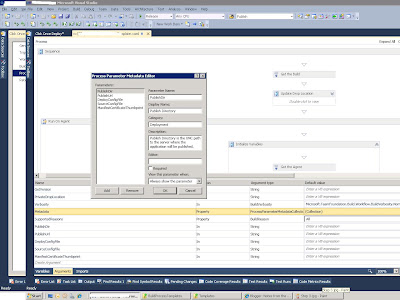
Step 3 lets find the config file we want to replace
Here is the template, if you'd rather just use it.
************
If you've searched and searched for an out of the box solution to deploying Click Once applications using Team Build 2010 you are in for some disappointment. There isn't one.
However, here are 5 easy steps to get this working. There are multiple ways to achieving a workable solution, have in mind that this solution worked for me, but might ultimately not help you. YMMV
The default build template works something like this.

The solution I came up with introduces an extra step between download and compile to introduce configuration management (Production config file vs Test config file, etc). I also hijacked the compile sources step and induced msbuild to publish the click once app. So it will look something like this.
Pre-requisites
Install a codesign certificate under the local profile of you build service account.
Step 1 New Template
Create a copy of the default build template. I called mine ClickOnceDeploymentTemplate.xaml.
The default build template is checked into your source control repository under
$[Team Project]\BuildProcessTemplates\DefaultTemplate.xaml
After you've created a new template don't forget to check it in. Let us verify that it works by using it in one of our own build definitions.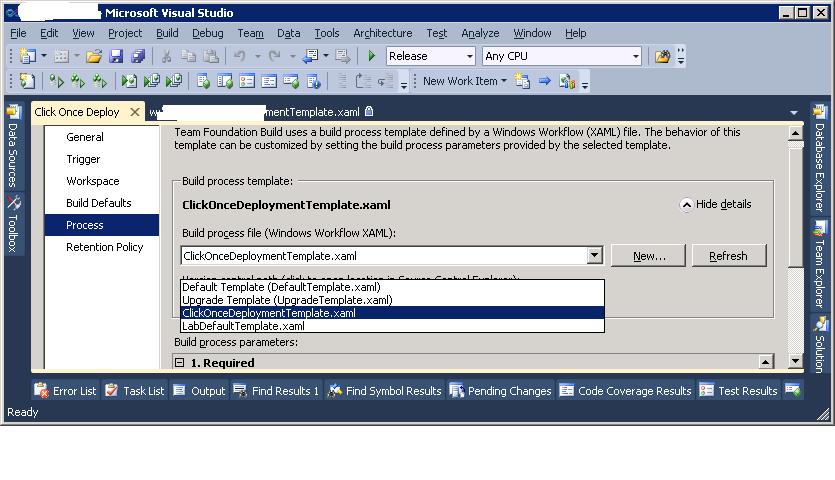 Step 2 Add some parameters
I followed Part 2 of the blog post series linked above and added a couple of new parameters to support what I had in mind.
PublishDir : This is the unc path to the location where you want to publish the app
PublishUrl: This is the url the .application file will use for the install/update fields
SourceConfigFile: Version control path of app.config file you want to replace for deployment
DeployConfigFile: UNC path to the app.config file you will use for deployment
ManifestCertificateThumbprint: This is the sha1 hashcode of the codesign certificate that is locally installed under build service account profile.
You can verify the parameters by refreshing the build definition you saved.


Step 3 lets find the config file we want to replace
Locate the "Get Workspace"activity. This activity is responsible for downloading the source code from the version control repository. It is located under:
Process > Sequence > Run On Agent > Initialize Workspace
a) We need to add a variable named LocalConfigFile. This variable will hold the file path to the local app config file on the build server.
b) We will also add a ConvertWorkspaceItem activity. This new activity will convert our version control path to the config file specified in our SourceConfigFile argument to a local workspace path held by the LocalConfigFile variable.
Step 4 lets replace it
We will need to add an invoke process activity to replace the app config file from our DeployConfigFile argument. To the location pointed by our LocalConfigFile variable.
Step 5 Publish
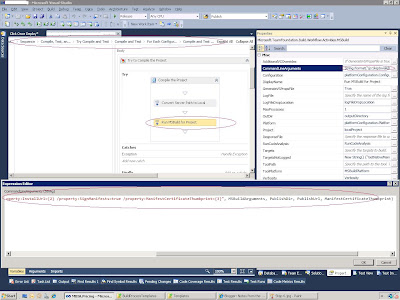
We will hijack the compile step of the template to tell msbuild to publish and sign the click once app. To do this we must first locate the "Run MSBuild for Project" MSBuild activity. It is the last activity before the tests are run. The path is too long to even try and write out. We will edit the CommandLineArguments property of this activity. We will replace its contents with the following:
String.Format("/p:SkipInvalidConfigurations=true {0} /Target:Publish /property:PublishDir={1} /property:PublishUrl={2} /property:InstallUrl={2} /property:SignManifests=true /property:ManifestCertificateThumbprint={3}", MSBuildArguments, PublishDir, PublishUrl, ManifestCertificateThumbprint)

What we are essensially doing is telling msbuild to go ahead and publish the app to the specified publish directory and sign it with the selected certificate. Save this template and you are done.
Tuesday, October 19, 2010
TFS 2010 Excel Report Dashboards Error: "Unexpected callback response! 400 Bad Request
Recently while migrating some Team Portals to a new Sharepoint Server, I started receiving the following error when accessing the excel report dashboards:
"Unexpected callback response! 400 Bad Request
Bad Request - Request too long"
There is a blog post by Grant Holiday http://blogs.msdn.com/b/granth/archive/2010/08/13/sharepoint-2010-error-http-error-400-the-size-of-the-request-headers-is-too-long.aspx that describes the error.
The original cause for the error is linked from his blog and it is somewhat of a mind stretch to understand. But from a practical point, the error was occurring due to a difference in setup between our old sharepoint server and the new one. The old server was using NTLM and the new one had been configured for kerberos.
"Unexpected callback response! 400 Bad Request
Bad Request - Request too long"
There is a blog post by Grant Holiday http://blogs.msdn.com/b/granth/archive/2010/08/13/sharepoint-2010-error-http-error-400-the-size-of-the-request-headers-is-too-long.aspx that describes the error.
The original cause for the error is linked from his blog and it is somewhat of a mind stretch to understand. But from a practical point, the error was occurring due to a difference in setup between our old sharepoint server and the new one. The old server was using NTLM and the new one had been configured for kerberos.
Wednesday, September 29, 2010
TFS 2010 Portal Customization Warning
If you are customizing the SharePoint portal for TFS 2010 here is a small warning/tip.
If you are dealing with the "Work Item Summary" web part beware that if you rename the underlying team query for it.
IE8 will become unresponsive, prompt weird error messages, and your team portal will refuse to load again. A colleague of mine experienced this issue this morning, and we were scratching our heads for a bit before finally arriving at a solution.
If you are dealing with the "Work Item Summary" web part beware that if you rename the underlying team query for it.
IE8 will become unresponsive, prompt weird error messages, and your team portal will refuse to load again. A colleague of mine experienced this issue this morning, and we were scratching our heads for a bit before finally arriving at a solution.
TFS 2010 Task Burndown Excel Report not showing any data?
This is a quick tip to those of you that are struggling to get any data to show up onto the Task Burndown excel report in the TFS agile 5.0 dashboard.
For some reasons unknown to me, the date filter on the "Date" row label is filtering all dates, even though it is configured to filter "This Month."


I was able to select the dates I wanted without the filter and show the report however that was still a little frustrating.
To fix this instead of using "Date" dimension for the row label is used a "Date Set > Last 4 Weeks" which has a similar effect to "This Month"

For some reasons unknown to me, the date filter on the "Date" row label is filtering all dates, even though it is configured to filter "This Month."

I was able to select the dates I wanted without the filter and show the report however that was still a little frustrating.
To fix this instead of using "Date" dimension for the row label is used a "Date Set > Last 4 Weeks" which has a similar effect to "This Month"

Thursday, July 1, 2010
Intersection of NUnit . MSTest and ONEWAY>
So here I am going down the TFS road and get to the intersection of MSTest and NUnit. I have always taken the NUnit road, but the MSTest road looks promising. So I start going down that path but soon realize, that only the entrance was pretty and everything else, road, sidewalks, buildings were in bad condition.
Let's stop talking figuratively, MSTest as an unit framework is still lacking compared to NUnit. Most of its value actually stems from the native integration with TFS. I was poised to make the roadtrip back to the intersection when google and some smart people came to the rescue.
http://alsagile.com/archive/2010/03/09/stop-the-war-between-nunit-and-mstest-make-them.aspx
Thanks to this link, I was able to continue using the awesome syntax I'm used to and take advantage of microsofts MSTest integration to TFS.
Let's stop talking figuratively, MSTest as an unit framework is still lacking compared to NUnit. Most of its value actually stems from the native integration with TFS. I was poised to make the roadtrip back to the intersection when google and some smart people came to the rescue.
http://alsagile.com/archive/2010/03/09/stop-the-war-between-nunit-and-mstest-make-them.aspx
Thanks to this link, I was able to continue using the awesome syntax I'm used to and take advantage of microsofts MSTest integration to TFS.
Wednesday, June 9, 2010
the 2010 Batch
I was recently tasked with bringing up a installation of Team Foundation Server 2010 here at work. I believe we have now navigated most of the technical roadblocks and are moving ahead just fine.
When I started this task I expected like any other Microsoft software. TFS would have dependencies with other MS technologies. What I had not realized is how much more dependencies the 2010 batch of technologies has than any other previous incarnation.
Take this as a cautionary tale dear reader. If you are embarking in the adoption of the any 2010 batch of MS technologies, be aware that they work best with one another and not so much across the year barriers.
When I started this task I expected like any other Microsoft software. TFS would have dependencies with other MS technologies. What I had not realized is how much more dependencies the 2010 batch of technologies has than any other previous incarnation.
Take this as a cautionary tale dear reader. If you are embarking in the adoption of the any 2010 batch of MS technologies, be aware that they work best with one another and not so much across the year barriers.
Subscribe to:
Posts (Atom)
